info.spuffs.social
Getting started with Mastodon on spuffs.social.
🐘 spuffs.social – Your Mastodon home
spuffs.social is part of the Mastodon network — a decentralized, community-run alternative to Twitter/X. This guide will help you get started.
What is Mastodon?
Mastodon is a social media platform similar to Twitter but with a twist: it’s federated. That means there’s no single company in charge. Instead, Mastodon is made up of independently run servers (called instances), like spuffs.social, that talk to each other.
You can follow people on any Mastodon instance — not just the one you signed up on.
Key Differences From Twitter
| Feature | Mastodon | Twitter/X |
|---|---|---|
| Ownership | Community-run | Nazis |
| Content Feed | Chronological (by default) | Algorithmic |
| Post Length | 500+ characters | 280 characters (unless subscribed) |
| Verification | Self-verification via links | Paid badge |
| Ads/Tracking | None | Yes |
| Custom Emojis | Yes | No |
Signing Up
- Go to https://spuffs.social
- Click “Create Account”
- Fill in your info and agree to the rules
- Confirm your email.
- We will verify your account and let you in.
Understanding the Interface
- Home: Posts from people you follow
- Local: Posts from everyone on spuffs.social
- Federated: Posts from across the whole Mastodon network from people you follow
- Notifications: Likes, replies, boosts, and follows
- Explore/Search: Hashtags, users, and trending posts
💡 Quick Tips
- Add a bio and avatar to help people find you
- Pin important posts to your profile
- Link to your Mastodon profile from your website to verify your identity
- Use hashtags to get your posts seen across the network
Tweets vs Toots vs Posts
On Mastodon, posts are called toots (or just posts these days). They can include:
- Text (500+ characters)
- Images, videos, audio
- Polls
- Content Warnings (CW) — to hide spoilers, sensitive topics, etc.
Boosts, Stars, Replies, Bookmarks
- 🔁 Boost: Shares the post to your followers, allowing it to appear in their Home feed. This is a useful mechanism for spreading the reach of the post in particular.
- ⭐️ Star: Like or favorite a post. Notifies the author of the post that you liked it. The post also gets added to your favorites.
- 💬 ⃔ Reply: Starts a thread or conversation as a reply to a post.
- 🔖 Bookmark: It adds it to your bookmarks, allowing you to more easily find the post again later on. Does not notify the author that you bookmarked their post. It’s just for your own use.
Privacy Controls
When you post, you can choose who sees it:
- 🌍 Public: Visible to everyone
- 👥 Followers Only: Only people who follow you
- 📬 Mentioned People Only: Like a direct message (but not end-to-end encrypted)
Media Tips
- Up to 4 images per post
- Videos and audio are supported
- You can add alt text for accessibility
- Use the CW feature to hide spoilers or sensitive images
🔍 Finding People
- You can follow users on other instances like:
@coolperson@mastodon.social - Use search to find people by username, hashtag, or post content
Customize Your Experience
- Use filters to hide content you don’t want to see
- Explore third-party apps or use the official Mastodon mobile app
- Enable dark mode, change language, and more in settings
Community Guidelines
Each instance has its own rules. On spuffs.social, we focus on being kind, respectful, and spam-free. Read the full guidelines here.
Following people in other instances
You can follow people outside of the spuffs.social instance. This allows you to see posts from them in your Other Servers live feeds (web interface) or Live feed (mobile app).
Method 1: From their profile
- Copy the person’s full Mastodon handle (looks like @username@instance.social)
- Paste it into the search bar on your own instance
- Click on their profile when it appears
- Click the “Follow” button
Method 2: Using the remote follow feature
- Visit their profile on their instance (you’ll see it in your browser)
- Click the “Follow” or “Subscribe” button
- A dialog will appear asking for your handle
- Enter your full Mastodon address (@yourname@yourinstance.social)
- You’ll be redirected to your own instance to confirm the follow
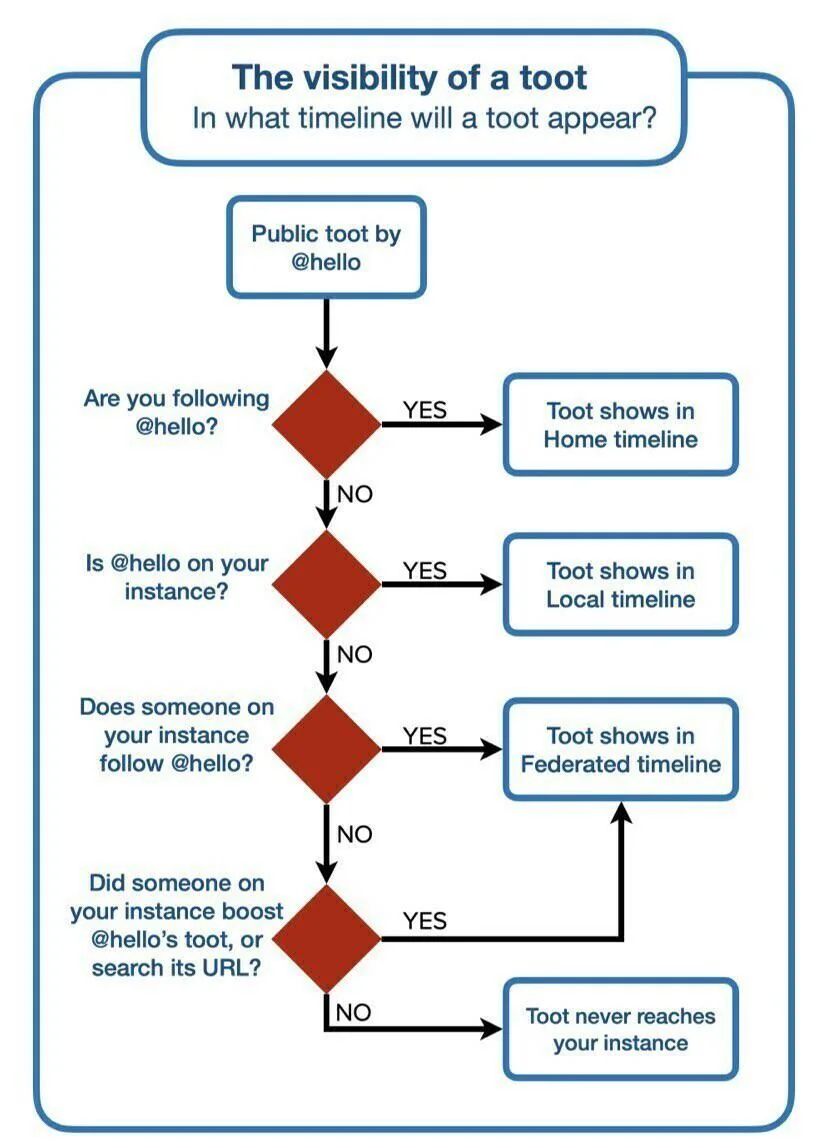
Other people’s post visibility
Post/toot visibility depends on the Mastodon instance they are on and if you follow them. The followin flowchart helps illustrate this:
❤️ Made With Love on Spuffs.social
You’re part of a friendly and growing community. Explore, post, boost cool stuff, and have fun!